Get Started
Steam Authentication Integration
This guide explains how to set up Steam Authentication. This feature allows players to log into your game automatically using their active Steam session, completely skipping the manual username and password screen.
Prerequisites
Before you begin, you must have an active Steamworks developer account and a registered Steam App ID for your game. If you haven't set these up yet, please check the Steamworks Account section first.
Once you have your Steamworks account and App ID ready, you can use the automated setup tool:
■ Click the button below to open the Integration Wizard.
■ Follow the on-screen steps to complete the setup.
Get Steam App ID
Finding Your Steam App ID
Once your Steamworks account and game application are set up, getting your App ID is simple. This unique number tells the Steam SDK exactly which game is making requests.
Here is how to locate it:
■ Go to the Steamworks Apps page at:
https://partner.steamgames.com/apps/
■ Find your game in the All Apps list and click on its name.
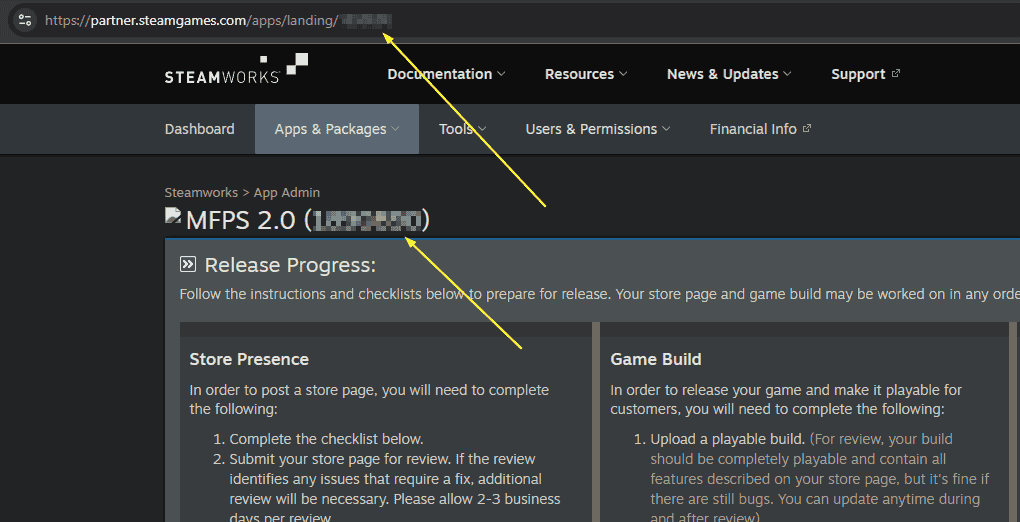
■ Look at the title at the top of the page. Your App ID is the number inside the parentheses next to your game's name (for example: Your Game Name (1234567)). You can also find this number at the very end of the page URL.
■ Copy this number, go back to Unity, and paste it into the App ID field in the Inspector for your SteamSettings file.
Login with Steam
Testing in the Unity Editor
With the integration complete, you can test Steam Authentication directly in the Unity Editor. Here is how the process works:
■ Make sure the Steam desktop app is running on your PC and you are logged in.
■ Open your Login scene in Unity and press Play.
■ The system will automatically detect your active Steam session and attempt to log in.
■ If this is your first time playing, the database will automatically create a new account for you. If you are a returning player, it will simply log you in and load your saved data.
If for any reason you don't want to automatically log in with Steam, you can turn off the 'Auto Login' option in the SteamSettings file > Automatically Init Steam. This will allow you to use the manual login form instead.
Steamworks Account
Setting Up Your Steamworks Account
To get a Steam App ID and publish games, you need to register for the Steamworks developer program. You use your standard Steam account to log in, but you must complete a specific onboarding process to access developer tools.
Here is how to get started:
■ Go to the Steamworks site:
https://partner.steamgames.com/
■ Sign in with your Steam account and begin the registration. You will need to provide your legal identity, banking details, and tax information.
■ Pay the Steam Direct fee (currently $100 USD per game). This fee is required to create your game profile and generate your App ID.
■ Wait for approval. Valve manually verifies your tax and banking documents. This process usually takes a few days, but it can take up to a week or more depending on your region and banks.
Once your account is fully verified and your Steam Direct fee is paid, you can create your new game application and get the App ID needed for this integration.